
$20/month or $200/year · 7-day free trial · Strength-based training app · Dumbbell-focused programmes · Self-paced workout format · Blog-based nutrition guidance; community via in-app tab and Facebook group · Personally tested: approximately one month across Foundation Moves, Strength Moves, and Endurance Moves programmes · Training weights used: 11 to 20 lb per hand · App and web browser · Prices verified April 2026
Moves App Review 2026: Quick Answer
Quick Verdict
The Moves App is a strength-focused training platform, rated 6.7 out of 10 after personal testing by a woman in her 40s navigating perimenopause. I came across Moves when researching strength-based programmes and signed up through the website, which was refreshingly simple. The app reminded me of EvolveYou but with a narrower focus and a slightly different approach. There is a lot to like here: solid dumbbell-based strength work, a genuinely impressive system of alternative exercises listed under each workout (including knee-friendly options, which stood out immediately given my history of knee issues), deload weeks built into programming, and clear muscle group images that show you exactly what you are about to work.
The Foundation programme, reviewed by a doctor, is a smart 6-week entry point for anyone returning to exercise. The Strength workouts were genuinely demanding: training at 11 to 20 lb per hand, I hit close to failure on several final sets. But the format was the dealbreaker for me. There is no voiceover, no coach talking you through the workout. You read the instructions, watch a looping video of each exercise, and work at your own pace. I prefer someone showing me and telling me what to do in real time, and without that, the sessions felt disconnected. The self-paced format also meant that workout durations got a bit longer for me than they are planned for as I had to read the descriptions and often adjust, which made it a bit harder to plan around my limited time. There is no filtering to find shorter workouts, no perimenopause or menopause content, no in-app nutrition tools, a basic community tab rather than a full interactive community, and no meditation. It is a simple, strength-focused app that does one thing and does it reasonably well, but at $20/month it is competing against platforms that offer significantly more for the same audience.
Is Moves App right for you?
Moves App is strongest for pelvic floor problems (6.5 out of 10, against a 4.6 average across the 76 programmes scored) and weakest for starting strength training (4.0 against 6.1).
| Question | Verdict | Rating | Score |
|---|---|---|---|
| How it suits a perimenopausal body | |||
| Is Moves App good for pelvic floor problems?Based on pelvic floor support and low-impact design | Moderate, but better than mostmost score 4.6/10 | 6.5 / 10 | |
| Is Moves App genuinely built for perimenopause and menopause?Based on menopause programming, hormone awareness, education and expert credibility | Low, about the same as mostmost score 3.3/10 | 3.3 / 10 | |
| Is Moves App good for painful joints?Based on low-impact design and recovery provision | Strong, and better than mostmost score 6.2/10 | 7.0 / 10 | |
| Is Moves App manageable when your energy is low?Based on recovery provision and mind-body support | Moderate, about the same as mostmost score 5.7/10 | 5.0 / 10 | |
| Is Moves App good if you are new to strength training?Based on beginner on-ramp and mind-body support | Low, and worse than mostmost score 6.1/10 | 4.0 / 10 | |
| Is Moves App good for building bone density?Based on bone loading and progressive strength | Strong, and better than mostmost score 5.1/10 | 7.0 / 10 | |
| Does Moves App help with nutrition?Based on midlife nutrition support | Low, and worse than mostmost score 4.1/10 | 3.0 / 10 | |
| How it performs as a product | |||
| Can you fit Moves App into a busy week?Based on time efficiency | Strong, about the same as mostmost score 7.6/10 | 7.0 / 10 | |
| Is Moves App worth the money?Based on value for money | Moderate, about the same as mostmost score 6.9/10 | 6.5 / 10 | |
Jump to Section
Moves App Review 2026: Why I Tested It
I found the Moves App while specifically looking for strength-based programmes. By this point I have tested close to fifty platforms and most of the ones marketed to women lean heavily on pilates, yoga, barre, or dance cardio.
Finding one built entirely around dumbbell-based strength training, with programmes designed by someone with an exercise physiology background, was enough to get me interested.
The platform also caught my eye because of its focus on postpartum and post-injury recovery, with a Foundation programme reviewed by a doctor, which suggested a more clinical approach than the typical influencer-led fitness app. Overall, Moves reminded me of the EvolveYou app, another strength-focused platform, but with a narrower content library and a slightly different workout format.
I wanted to see whether that difference in format worked in its favour or against it.
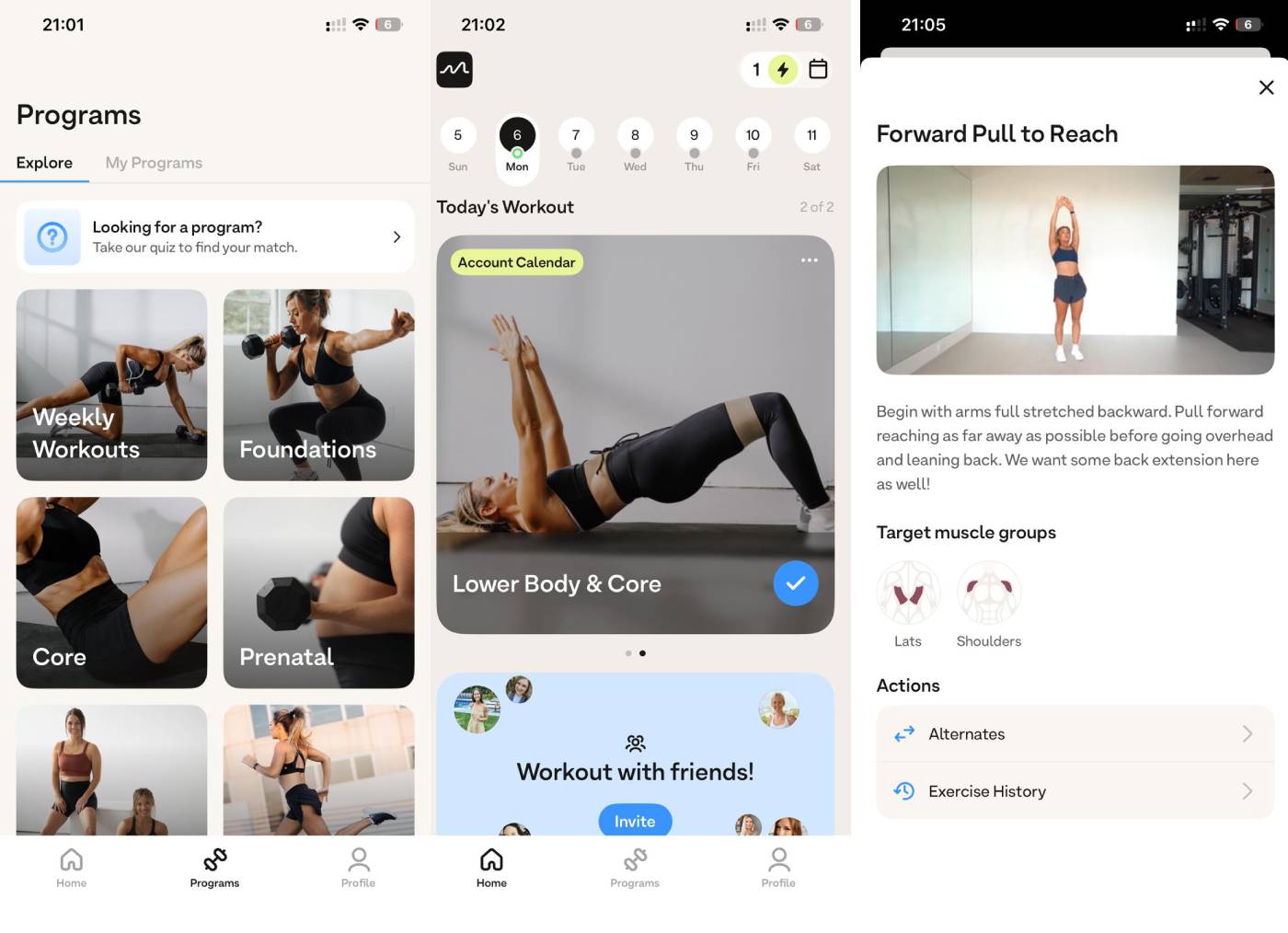
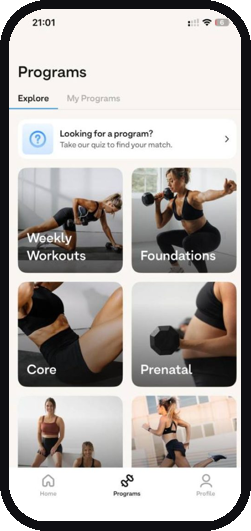
Screenshots of Moves App showing programs section, workout calendar, and example of an exercise card with description and targeted muscle groups.
What Is the Moves App?
The Moves App (also listed as MOVES by Madeline in the app stores) is a women’s fitness app built around dumbbell-based strength training.
Unlike many platforms that try to cover every modality from yoga to HIIT to meditation, Moves keeps its focus tight: structured strength programmes, weekly updated workouts, and running-integrated training.
The app currently offers eight programmes covering foundation strength, dedicated strength training, core work, endurance, travel-friendly workouts, prenatal, and postpartum training. The workout format is distinctive and worth understanding before you sign up. There is no coached video where an instructor talks you through the session. Instead, each exercise is presented with a looping demonstration video and written instructions that you read yourself.
You work at your own pace, choosing how heavy to go and how long to rest. The app includes a built-in timer so you do not need a separate tracking tool, and you can log your workouts and track progress directly within the app. Most workouts offer the option to set them at 30 or 60 minutes, though because the format is self-paced, your actual session length will vary depending on how quickly you move through the exercises and how long you spend reading the descriptions.
Who Is Behind the Moves App?
Moves was created by Madeline Custer, a former athlete with a B.S. in Exercise Physiology who is also Pre/Postnatal Certified. She runs the platform alongside Brandon Moss, making it a husband-and-wife operation.
The team also includes qualified coaches ranging from Doctors of Physical Therapy to certified fitness and nutrition instructors. The Core Moves programme, for example, was designed by a Pelvic Floor PT, and the Foundation programme has been reviewed by a doctor. The platform has grown over the past four years and now reaches over 30 countries, though it remains smaller and less well-known than many of the platforms I typically review.
It holds a 4.8-star rating on Google Play with around 300 reviews at time of writing.
How Do You Get Started with the Moves App?
Signing up on the website was one of the simplest processes I have experienced across all the platforms I have tested. No lengthy onboarding questionnaire, no confusing steps.
You create an account, start the 7-day free trial, and you are in. Cancelling is equally straightforward, done directly from your account settings, which is something I always check and always appreciate when it is not buried behind customer service emails. Once inside, you can browse the available programmes, follow the Weekly Moves schedule for daily workouts that update each week, or explore individual sessions.
The interface is clean and functional, though as I will cover later, it is missing some filtering options that I have come to expect from other platforms.
What I Actually Tested
I tested the Moves App for approximately one month. I started with the Foundation Moves programme but moved on after about two weeks: the workouts were structured well enough but the read-based format meant I was never going to stick with it long-term.
From there I worked through sessions from Strength Moves and tried the Endurance Moves programme, which mixes strength work with running.
I also dipped into the Weekly Moves schedule to see how the daily programming worked on its own. I came to Moves as an experienced exerciser in my mid-forties, in perimenopause, with a history of knee issues.
I had been training on platforms like Burn360 and Fit with Coco before this, using 11 to 20 lb per hand on most exercises.
I arrived with a solid base of strength training and an expectation of coached video workouts. The Moves format was a significant departure from that, and ultimately it was the reason I stopped. One personal note on programme selection: I gravitate towards full-body sessions rather than upper or lower body splits.
An upper body only day leaves me feeling like I have not done enough, and research on training frequency in women suggests full-body sessions three to four times per week is a viable and effective approach.5 The Strength Moves programme includes a mix of session types, and I tended to stick with the full-body options.
What Are the Moves App Workouts Like?
The workouts are built around dumbbells and compound movements. Squats, lunges, curls, push-ups with dumbbells: this is proper, traditional strength training.
You choose your own weight for each exercise, which means you can scale the difficulty to wherever you are. I was training with 11 to 20 lb per hand across most exercises, and I found the Strength workouts genuinely demanding at that load.
On several occasions I hit close to failure by the final set, which tells you the programming is calibrated for real effort rather than just going through the motions.
Research supports training close to failure for meaningful muscle adaptations, though stopping a few reps short produces similar results in most cases.3 One feature that immediately stood out was the muscle group images shown before each workout.
You can see exactly which muscles you are about to target, which I found genuinely useful for understanding the purpose of each session and planning my training week. Under each workout there is a list of alternative versions for different situations: no equipment, knee-friendly, harder variations, and more.
Having had knee issues myself, this was one of the most practical features I have encountered on any platform. It is not hidden behind a menu or buried in a help section.
It is right there, clearly listed, under the workout you are about to do. If you have joint considerations, this alone makes the app worth trying during the free trial. The workouts are mainly self-paced.
You work through each exercise at your own speed, rest when you need to, and move on. The app has a built-in timer, and you can log your sets and weights to track progress over time.
Most workouts let you choose between a 30-minute or 60-minute format.
The Format: Where Moves Lost Me
Here is the plain truth about the Moves App workout format: it did not work for me. Each exercise is presented as a looping video demonstration with written instructions.
There is no voiceover. No coach telling you what to do, when to move, how to adjust your form in real time. You read the description, watch the loop, and execute.
For some people, this is a positive. You can listen to your own music, work entirely at your own pace, and there is no chatty instructor filling silence.
I can see the appeal. For me, though, I want a coach showing me the movement and talking me through it as I do it. I want to hear cues about form, tempo, and breathing while I am mid-set, not read them beforehand and try to remember.
The read-based format made the sessions feel disconnected. I found myself stopping to re-read instructions, losing momentum, and taking longer than I expected to get through a workout.
What should have been a 30-minute session sometimes stretched beyond that because of the time spent reading and referencing the descriptions. This is personal preference, and I want to be clear about that.
If you are someone who prefers to work independently, likes controlling your own pace completely, and wants music instead of instructor chatter, the format may suit you well.
Several user reviews I found praised exactly this aspect. But if you are used to platforms like Fit with Coco, Pvolve, or The Sculpt Society where a real instructor leads you through each session on video, the Moves format will feel like a step backwards. The other consequence of the self-paced format is that workout durations are not clearly stated on many sessions.
Because you control the pace, the app does not tell you how long a workout will take. For someone with limited time, which is most of the women reading this review, that is a significant drawback.
I need to know whether a session fits into the 25 minutes I have before school pickup. Without a clear duration, I cannot plan my day around it. Some platforms solve this with duration filters.
Moves does not have those either.
Programmes I Tested
Foundation Moves
This is the entry-level programme: a 6-week plan to get you into regular training, reviewed by a doctor. That clinical endorsement gives it more credibility than most beginner programmes on similar apps.
The exercises are accessible, the progression is sensible, and the structure gives you a clear path. I completed approximately two weeks of Foundation Moves before switching to the Strength programme.
Not because the content was poor, it was actually well put together, but because the format simply did not work for me. Reading exercise instructions and watching looping demos rather than following a coach in real time felt like studying for a class rather than doing one.
The motivation gap accumulated quickly. On days when energy was already low, having to read before I could start working was one friction point too many. For someone who is confident working independently and does not need real-time coaching, Foundation Moves is a genuinely solid 6-week starting point.
The doctor-reviewed credential is not marketing fluff, the progression structure shows proper understanding of beginner programming. But if you need an instructor’s voice to stay engaged, you will likely feel the same flatness I did.
Strength Moves
The Strength Moves programme is an 18-week plan split into two 9-week phases. Phase 1 builds towards greater strength training emphasis while maintaining some metabolic conditioning.
Phase 2 graduates from Phase 1 and moves further into dedicated strength work. This is serious programming, not a cosmetic add-on. The exercises are what you would expect from a well-designed strength programme: squats, lunges, curls, push-ups, all dumbbell-based.
You choose your weight, which means someone lifting 7 lb and someone lifting 22 lb can both follow the same programme. I appreciated the freedom to load as heavy as I wanted to go.
The deload weeks built into the programming are a thoughtful touch that I do not see on many women’s fitness apps. Evidence supports planned deloads to manage physiological and psychological fatigue, with most coaches and researchers recommending a deload period every 4 to 8 weeks of progressive training.4 Most platforms aimed at women ignore this entirely.
Moves does not. After trying a few workouts from Strength Moves, I could see this programme producing genuine results for someone who commits to the full 18 weeks.
The structure is there, the exercise selection is sound, and the ability to choose your own load means the ceiling is as high as you want to make it.
Endurance Moves
I also run, so I was curious about the programme that combines strength training with running. The Endurance Moves programme was developed with experts in Physical Therapy and Strength and Conditioning, and it provides the foundation for integrating strength work with whatever endurance activities you love. I enjoyed the concept and tried several sessions.
On some days, though, the running pace felt too fast for where I was, and I modified it significantly, going much slower than prescribed. This is fine because the self-paced format accommodates that, but it does mean the programme as written may not suit everyone’s current running fitness.
If you are already a confident runner looking to add structured strength work, this is a smart combination. If you are building your running from scratch, expect to modify frequently.
Weekly Moves
If you do not want to follow a structured multi-week programme, the Weekly Moves option gives you five fresh workouts each week, each around 30 minutes.
These are updated regularly and give you a simple daily plan without the commitment of a longer programme. I dipped in and out of these between my programme testing and found them to be solid, straightforward strength sessions.
For someone who just wants to open the app and be told what to do today, this is the easiest entry point.
Equipment: What Do You Need?
The Moves App is built around dumbbells and bodyweight. You do not need specialty equipment, bands, or branded accessories. Every workout lists alternative exercises including no-equipment options, so you can start with what you have.
Starter Dumbbells (up to 10 lb)
A light adjustable pair, a great starting point
~$65 to $80
Medium Dumbbells (up to 25 lb)
For steady progression as you get stronger
~$50 to $65
Advanced Dumbbells (up to 50 lb)
For serious strength and progressive overload; grows with you
~$350 to $430
No Equipment Option
Every workout includes bodyweight and no-equipment alternatives listed under each exercise.
Free
This is one of the best modification systems I have seen. Knee-friendly, no equipment, and harder variations are listed right there, clearly, under each workout.
Running Shoes
Required only for the Endurance Moves programme, which integrates running with strength training.
Use what you already own
Only relevant if you choose the running-integrated programme. The strength-only programmes need no footwear beyond what you would normally train in.
A quick heads-up: some of the buy links above are Amazon affiliate links, so if you grab something through them I may earn a small commission, at no extra cost to you. I only ever point you to kit I’d happily use myself.
Is the Moves App Good for Women Over 40?
It has genuine strengths for this audience, but it is not designed with them specifically in mind. What works: the strength training focus is exactly what most women over 40 need.
A meta-analysis of 80 studies found that resistance training at moderate to high loads (approximately 65 to 80% of maximum effort, or roughly 6 to 12 challenging reps) consistently improves bone mineral density at the spine and hip in postmenopausal women.1 A separate systematic review published in 2023 confirmed resistance training is among the most effective interventions for preserving bone density in women navigating the menopausal transition.2 Moves delivers exactly this kind of training: proper dumbbell-based strength work with the freedom to load as heavy as you want.
The deload weeks show an understanding of recovery. And the alternative exercise options, including knee-friendly variations, are thoughtful for a body that may not tolerate every movement the way it used to. What is missing: there is no in-app programme specifically addressing perimenopause, menopause, or the hormonal changes that affect training for women over 40. The app’s speciality areas lean towards postpartum recovery, prenatal fitness, and post-injury rehabilitation. The Moves blog does include a perimenopause-focused article with guidance from their PT and nutritionist, but this has not yet translated into dedicated in-app content.
The Foundation programme, reviewed by a doctor, is excellent for someone returning to exercise, and the Core Moves programme designed by a Pelvic Floor PT has obvious value.
But none of this is framed around the midlife experience. There is no in-app guidance on how hormonal changes might affect your training, no programme adapted for perimenopause, and no instructors speaking directly to this audience, though the blog has begun addressing these topics.
For a platform that could easily serve women over 40 given its strength training foundation, the gap is noticeable. You will get a good strength programme.
You will not get one that understands why you might be training differently now compared to ten years ago. The score of 6 out of 10 for Women Over 40 Specificity reflects this balance: the core training approach is genuinely suitable, but the lack of targeted content and guidance for this life stage holds it back.
This is the perimenopause and menopause assessment, and it is separate from the overall score. Twelve things a programme either does for a midlife body or does not, each scored out of 10 with my reasoning next to it. Together they produce a single menopause fit score, and that becomes one of the nine categories in the overall scoring below.
How Moves App Fits Perimenopause, Menopause & Beyond
Women Over 40 is our most important criterion, and here's the full breakdown behind it.
Moves App is strongest for recovery & deload, and weakest for menopause programming, hormone awareness, menopause education, mind-body support and midlife nutrition, in our menopause and midlife capability assessment for women over 40.
At a glance
| Capability | Score | Rating | Why |
|---|---|---|---|
| Right training for a midlife body | |||
| Low-impact | 6/10 | Some | Knee-friendly alternatives under every workout; strength-based. |
| Progressive strength | 7/10 | Strong | Choose-your-load, near-failure, 18-wk phased; weekly-novelty critique. |
| Bone loading | 7/10 | Strong | Heavy loadable dumbbell resistance matches BMD evidence. |
| Recovery & deload | 8/10 | Strong | Scheduled deload weeks built in; rare, standout periodisation. |
| Built for menopause | |||
| Menopause programming | 2/10 | None | No in-app peri/menopause programme; blog article only. |
| Pelvic floor | 7/10 | Strong | Core Moves designed by a Pelvic Floor PT; genuine credential. |
| Hormone awareness | 2/10 | None | No in-app hormonal guidance. |
| Menopause education | 2/10 | None | No in-app education; one perimenopause blog article. |
| Expert credibility | 7/10 | Strong | Exercise-physiologist founder, DPTs, doctor-reviewed Foundation. |
| Whole-woman support | |||
| Mind-body support | 2/10 | None | No meditation/mindfulness; basic community only. |
| Beginner on-ramp | 6/10 | Some | Doctor-reviewed 6-wk Foundation; read-based format adds friction. |
| Midlife nutrition | 3/10 | Minimal | No in-app nutrition; blog basics + separate paid challenge. |
ScaleBest-in-classStrongSomeMinimalNone
What the sources say: Strong strength/pelvic-PT/deloads confirmed; zero menopause/hormone programming confirmed everywhere. Skews postpartum/younger; weekly-novelty model favours variety over tracked overload.
These are evidence-informed suitability ratings, not clinical measurements. They combine exercise science with product-specific research and, where indicated, hands-on testing, alongside multi-source verification, and are approximate. Individual response varies. A starting point, not medical advice. How we score menopause fit
Does the Moves App Help with Perimenopause and Menopause?
There is no dedicated perimenopause or menopause programme within the app, and no hormonal health guidance built into the training experience. The app’s recovery and rehab content is focused on postpartum and post-injury, not on the hormonal transitions of midlife.
However, the Moves blog published a perimenopause-specific article in July 2025 covering fitness and nutrition during the transition, developed with input from their in-house physical therapist and nutritionist. This shows awareness of the audience, even if it has not yet translated into in-app programming. The strength training itself is beneficial.
Resistance training is widely recommended for women in perimenopause and menopause to support muscle mass and bone density.1,7 But you can find that on many platforms.
What you will not find within the app itself is programming that acknowledges your body is changing and that your training might need to change with it. If dedicated perimenopause programming is a primary requirement, Pvolve’s Menopause Strong leads in this space with clinical research behind it. Evlo also offers dedicated content.
Moves does not compete on this front.
How Good Is the Moves App?
The app is clean and functional. Signing up was simple, navigating the programmes is straightforward, and the interface does not overwhelm you with options.
The muscle group images before each workout are a nice visual touch that adds practical value. The built-in timer and workout logging work as expected, meaning you do not need a separate app to track your sessions. Where the experience falls short is in filtering and search.
I found myself wanting to filter workouts by duration, by difficulty, by equipment required, or by body area. None of these filters exist in the way I have come to expect from more established platforms.
If you want a 20-minute upper body session and do not want to scroll through everything to find one, you are stuck. There is an AI chat feature that can help point you in the right direction, but it is not a substitute for proper filtering that lets you browse and choose efficiently. The lack of displayed workout durations on self-paced sessions compounds this problem.
On platforms like Pvolve or The Sculpt Society, I can scan a list of workouts and immediately see which ones fit my available time.
On Moves, I often had to start a session to understand how long it would actually take. For time-poor women, this is a real friction point. The app holds a 4.8-star rating on Google Play with around 300 reviews, which suggests that users who suit the format are happy with it.
It is still a relatively small platform compared to the major players, and the content library reflects that: focused but limited.
How Much Does the Moves App Cost?
The Moves App costs $20 per month or $200 per year (equivalent to $16.67/month, saving approximately 17%). Both plans include a 7-day free trial with full access. Moves charges in USD only, so UK users will see approximate conversions at checkout.
| Plan | Price | Notes |
|---|---|---|
| Monthly | $20/month | 7-day free trial included; cancel anytime from account settings |
| Annual | $200/year ($16.67/month equivalent) | Saves ~17% vs monthly; 7-day free trial included |
Prices verified April 2026. Moves charges in US dollars only. UK users will see approximate conversions of ~£16/month or ~£158/year depending on exchange rates.
Verify current pricing at movesapp.com. At $20/month, Moves sits in the middle of the market.
It is cheaper than Evlo ($55.99/month) and Fit with Coco ($39.95/month), roughly comparable to Pvolve ($24.99/month), and more expensive than Melissa Wood Health ($14.95/month).
Whether it represents good value depends on what you need from a fitness app. If you want a straightforward strength training programme and the self-paced format suits you, the price is fair.
If you expect the full-service experience that platforms like Fit with Coco or Pvolve provide, with coached videos, filtering, integrated nutrition tools, and a fully interactive community, $20/month feels steep for what you get.
Will You Actually Stick With It?
This depends almost entirely on whether the workout format works for you. If you are comfortable reading exercise instructions and working independently, the structured programmes and weekly updates give you enough fresh content to stay engaged.
The 18-week Strength Moves programme alone provides nearly five months of planned training, and the deload weeks are a smart retention feature because they signal that the programming understands how real training works. If, like me, you need a coach guiding you through the workout in real time, you will likely drift away.
The self-paced, read-based format requires more self-motivation than a coached video does. On days when energy is low, having someone telling you “three more reps, you’ve got this” makes a real difference compared to reading instructions on a screen.
Moves App Weighted Scoring: How the 6.7/10 Was Calculated
This is the overall score, and it asks a broader question: how good is this programme, full stop. Nine categories, each weighted by how much it matters to a woman in perimenopause or beyond, which is why Muscle Potential counts for more than Value for Money. The Women Over 40 Specificity row is the perimenopause and menopause fit score from the twelve capabilities above, carried through.
Category Weight Score Weighted Time Efficiency 15% 7.0 1.05 Muscle Potential 18% 8.0 1.44 Women Over 40 Specificity 10% 5.1 0.51 Joint Friendliness 12% 8.0 0.96 Recovery Compatibility 10% 7.0 0.70 Programme Structure 12% 7.0 0.84 Value for Money 8% 6.5 0.52 UX and Design 8% 6.0 0.48 Nutrition Integration 7% 3.5 0.25 Total 100% 6.7 / 10
What Are the Pros and Cons of the Moves App?
What Works
- Genuine strength training focus built around dumbbells and compound movements; this is proper resistance work, not rebranded pilates
- Alternative exercise options listed under each workout including knee-friendly, no equipment, and harder variations: one of the best modification systems I have seen on any platform
- Muscle group images before each workout clearly show which areas you will target, genuinely useful for planning your training week
- Foundation Moves programme reviewed by a doctor provides a credible entry point for beginners and those returning from injury
- Deload weeks built into programming show a real understanding of how progressive strength training works
- Choose your own weight means the difficulty ceiling is as high as you want it to be; works for beginners through advanced
- Signing up and cancelling are both straightforward, done directly from your account settings
- Built-in timer and workout logging mean no need for separate tracking apps
- Core Moves designed by a Pelvic Floor PT adds clinical credibility
- Endurance Moves programme smartly combines strength training with running for those who want both
- 18-week Strength Moves programme provides serious long-term structure with two progressive phases
What to Know Before Signing Up
- No voiceover or real-time coaching; you read exercise instructions and watch looping demo videos, which may feel disconnected if you prefer guided workouts
- No displayed workout durations on self-paced sessions; impossible to plan around a tight schedule without starting the session first
- No filtering options by duration, difficulty, equipment, or body area; finding a specific type of workout requires scrolling or using the AI chat
- No in-app perimenopause or menopause programme; no hormonal health guidance within the app; blog covers perimenopause basics but content focus is on postpartum and post-injury
- No in-app nutrition tools or meal plans; nutrition content limited to blog articles and the separate Move Together challenge
- Community limited to an in-app tab and subscriber Facebook group; no live interactive community; no meditation or mindfulness content
- Self-paced format meant sessions ran longer than expected for me due to time spent reading instructions
- Smaller content library than most competitors; focused on strength but limited variety in workout modality
- Priced in USD only; no UK-specific pricing
- Still a relatively young and small platform; content library and features may be less mature than more established competitors
How the Moves App Compares to Similar Platforms
If you are deciding between strength-focused fitness platforms, this is how Moves sits against the most likely alternatives for women over 40. All HerDailyFit scores marked with a number are from personal testing against the same weighted criteria.
| Feature | Moves App | EvolveYou | Fit with Coco | Pvolve | Evlo |
|---|---|---|---|---|---|
| HerDailyFit score | 6.7 / 10 | 6.1 / 10 | 7.9 / 10 | 8.3 / 10 | 8.0 / 10 |
| Monthly price | $20/mo | $22.99/mo | $39.95/mo | $24.99/mo | $55.99/mo |
| Free trial | 7 days | Annual plan only (7 days) | 7 days, no card (monthly) | 7 days | 7 days |
| Method | Dumbbell strength, self-paced | Strength + gym-style training | Strength + Pilates hybrid (3-2-1) | Functional fitness, 3D movement | Science-based strength + mobility |
| Coached video | No: looping demos + written instructions | Yes | Yes | Yes | Yes |
| Session length | 30 or 60 min options; self-paced | 20 to 45 min | 20 to 30 min most sessions | 5 to 60+ min; 20 min plentiful | 30 to 45 min |
| Muscle building potential | Moderate to high (choose your load) | Moderate to high | Moderate to high | Moderate | High |
| Perimenopause content | None | None | Menopause talk + meal plans; no dedicated programme | Best in class: Menopause Strong, clinical study | Yes, dedicated |
| Nutrition included | Blog only; Move Together adds meal plans (extra cost) | Macro plan + recipe library | Anti-inflammatory meal plans + guides | Not in streaming | Guidance included |
| Injury modifications | Excellent: knee-friendly, no equipment, harder alternatives under each workout | None: must self-modify | Beginner mods; no rehab tracks | Dedicated series for 6 body areas | Per exercise |
| Best suited to | Self-directed strength trainers; runners wanting strength; post-injury/postpartum | Women wanting gym-style strength training | 35 to 55, structured strength + Pilates | 35 to 55, perimenopause, joint issues | 35 to 55, science-based strength |
Competitor prices verified April 2026. Verify on each platform’s website. Scores marked TBC will be updated as reviews are published.
Is the Moves App Worth It?
For women who want straightforward, dumbbell-based strength training and are comfortable working independently from written instructions: it is worth trying during the free trial. The programme structure is solid, the exercise alternatives are genuinely impressive, and the ability to choose your own weight means the platform scales from beginner to advanced.
If the format suits you, the 18-week Strength Moves programme alone provides nearly five months of structured, progressive training with deload weeks built in.
Foundation Moves, reviewed by a doctor, is one of the more credible beginner programmes I have seen. For women over 40 specifically: the strength training focus is right, but the lack of perimenopause content, filtering options, and real-time coaching limits the experience.
At $20/month with no in-app nutrition tools, a basic community tab, and no meditation, strength programming is the core of what you are paying for. The community tab and Facebook group add some connection, and the blog covers nutrition basics, but the overall package is thinner than what Fit with Coco and Pvolve deliver for this audience. For me personally, the format did not work.
I want a coach in my ear telling me what to do and how to do it. Without that, the sessions felt like work rather than training. But I recognise that some women want exactly what Moves offers: no chatter, their own music, their own pace, just the exercises and the structure.
If that sounds like you, the 7-day free trial costs nothing and will tell you everything you need to know. The Moves App feels like a platform that is still developing.
The foundation is strong, the programming is credible, and with more features (filtering, workout durations, coached video options, and content for women over 40), it could compete seriously with the more established platforms.
Right now, it is a solid strength training tool with notable gaps in everything around it.
Common Moves App Complaints
Looking at user reviews and feedback alongside my own testing, a few themes come up consistently. The most common complaint mirrors my own experience: the self-paced, read-based format does not work for everyone.
Users who expected coached video instruction are regularly disappointed. This is not a design flaw so much as a deliberate choice, but it catches people off guard if they have not read carefully what the format involves.
The 7-day free trial exists precisely for this reason: use it to test the format before committing. The second recurring theme is the absence of workout durations on self-paced sessions.
Users who have limited time and need to plan their training around a busy schedule find it frustrating to start a workout without knowing how long it will take.
A session billed as “30 minutes” can run longer depending on rest periods and reading time. This is a legitimate UX gap that the platform has not yet addressed. A third point, less common but worth flagging: the content library is small compared to more established platforms.
Eight programmes cover a reasonable range, but users who have been on the platform for several months and have worked through the main programmes are left with fewer fresh options than they would find on larger apps.
The Weekly Moves updates help, but it is not a substitute for the depth of a platform like Pvolve or Fit with Coco. What is notably absent from negative reviews: billing issues, poor customer service, or technical problems.
The app functions smoothly and cancellation is straightforward, which accounts for something.
Moves App FAQ
The Moves App provides genuine strength training with dumbbell-based programmes and excellent exercise alternatives including knee-friendly options. The ability to choose your own weight means it works at any fitness level. However, there is no in-app perimenopause or menopause programme (though the blog covers perimenopause basics), no hormonal health guidance within the training experience, and the format requires reading exercise instructions rather than following a coached video. For dedicated perimenopause programming, Pvolve is the stronger choice. Consult your doctor about what training approach suits your individual needs.
Most workouts offer 30-minute or 60-minute options. Because the format is self-paced, your actual session length will vary depending on how quickly you move through exercises and how long you spend reading instructions and resting between sets. During my testing, sessions often ran longer than the selected option because of the read-based format.
Yes. The Moves App is built around dumbbell-based strength training with compound movements like squats, lunges, curls, and push-ups. You choose your own weight, so the muscle-building potential is as high as you are willing to load. The 18-week Strength Moves programme provides progressive structure with deload weeks. This is genuine resistance training, not rebranded pilates or light toning work.
As of April 2026: $20/month or $200/year ($16.67/month equivalent, saving approximately 17%). Both plans include a 7-day free trial. Pricing is in US dollars only; UK users will see exchange rate variations at checkout.
No. The Moves App uses a self-paced format where each exercise has a looping demonstration video and written instructions. There is no voiceover, no real-time coaching, and no instructor guiding you through the session. You read the instructions and work at your own pace. This is a core design choice that suits some users but will feel like a limitation if you prefer guided workouts.
The Moves App has one of the best modification systems I have tested. Under each workout there is a list of alternative versions for different situations, including knee-friendly options. Having tested with a history of knee issues, I found this feature genuinely practical and well-implemented. The self-paced format also means you can take as much time as you need between exercises. If you have an existing injury or health condition, consult your doctor before starting.
The core app subscription does not include meal plans, calorie tracking, or in-app nutrition tools. However, the Moves blog covers nutrition topics including perimenopause-specific guidance, and the periodic Move Together challenge (a separate paid programme) includes personalised macro counts, 40+ recipes from a Registered Dietitian, and a 4-week meal guide. If you want nutrition fully integrated into your daily training platform, Fit with Coco includes anti-inflammatory meal plans, and Evlo provides nutritional guidance as part of the programme.
Both are strength-focused apps for women, but they differ in format. EvolveYou uses coached video workouts where an instructor guides you through each session. Moves uses a self-paced format with looping demo videos and written instructions. Moves offers excellent exercise alternatives (knee-friendly, no equipment, harder) and deload weeks, while its content library is smaller and it lacks the coached video experience. The right choice depends on whether you prefer independent, self-directed training or instructor-led sessions.
Final Verdict
One month of dumbbell-based strength training. Three programmes tested: Foundation, Strength, and Endurance Moves. No coach talking me through the movements, no real-time form cues, just looping video demos and written instructions I read before each set. That format was the sticking point for me. I want someone in my ear telling me to squeeze, slow down, adjust. Without that, the sessions felt mechanical rather than motivating.
But the programming itself is solid. The exercise alternatives under every workout are genuinely impressive, especially the knee-friendly and no-equipment options. Foundation Moves, reviewed by a doctor, is one of the more credible beginner programmes I have tested across nearly fifty platforms. The Strength Moves programme offers eighteen weeks of structured, progressive training with deload weeks built in, which is more thoughtful periodisation than many higher-priced competitors provide.
For women over 40: the strength training focus is right, but the gaps are real. No perimenopause-specific content, no filtering by health concern, only a basic community tab and Facebook group, no in-app nutrition. At $20 per month strength programming is the core of what you are paying for. The community tab and Facebook group add some connection, and the blog covers nutrition basics, but the overall package is thinner than what platforms like Fit with Coco and Pvolve deliver for this audience.
If you are self-directed, comfortable reading written instructions, and want a clean, no-nonsense dumbbell programme without the noise of a full wellness platform, the Moves App does that one thing well. The 7-day free trial costs nothing and will tell you everything you need to know. The foundation is strong. The platform around it still has room to grow. Score: 6.7 / 10
References
- Hsu W-H, et al. “Effects of exercise on bone density and physical performance in postmenopausal women: A systematic review and meta-analysis.” PM&R. 2024. doi:10.1002/pmrj.13206
- Frontiers in Physiology. “Comparative efficacy of different resistance training protocols on bone mineral density in postmenopausal women: A systematic review and network meta-analysis.” 2023. frontiersin.org
- Refalo MC, et al. “Influence of Resistance Training Proximity-to-Failure on Skeletal Muscle Hypertrophy: A Systematic Review with Meta-analysis.” Sports Medicine. 2023. PMC9935748
- Lorenz D, Morrison S. “Current Concepts in Periodization of Strength and Conditioning for the Sports Physical Therapist.” International Journal of Sports Physical Therapy. 2015. See also: Enes A, et al. “Deloading Practices in Strength and Physique Sports: A Cross-sectional Survey.” Sports Medicine Open. 2024. PMC10948666
- Colquhoun RJ, et al. “Training Volume, Not Frequency, Indicative of Maximal Strength Adaptations to Resistance Training.” Journal of Strength and Conditioning Research. 2018; also: Brigatto FA, et al. “A randomized trial on the efficacy of split-body versus full-body resistance training in non-resistance trained women.” BMC Sports Science, Medicine and Rehabilitation. 2022. doi:10.1186/s13102-022-00481-7
- Business of Apps. “Health & Fitness App Benchmarks 2026.” businessofapps.com. Accessed April 2026.
- Stojanovska L, et al. “To exercise, or, not to exercise, during menopause and beyond.” Maturitas. 2014;77(4):318 to 323. doi:10.1016/j.maturitas.2014.01.006
- American College of Sports Medicine. “Physical Activity Guidelines.” acsm.org. Accessed April 2026.
Related Guides
What To Do Next
Not sure this is the right programme for you?
- → Take our 2-minute quiz for a personalised recommendation.
- → See our best workouts for perimenopause rankings
- → See our best workouts for women over 40 rankings
- → See how we score every programme using 9 weighted criteria.